AI that runs every job, from call to invoice.

All-in-One AI Field Service Software for Trades

Never miss
a job call

Clevra's AI receptionist picks up when you can't. It asks the right questions and creates the request. Form, email and portal requests land in the same inbox.

Hi, I need a septic inspection. We close on the house Friday.
I can help with that. What's the address of the property?
418 Cedar Lane.
Thanks, Sarah. I've sent your request to the team. They'll text you to confirm a time.
Call answeredToday, 7:42 PM · 1:48
CallerSarah P.
ServiceSeptic inspection
Address418 Cedar Lane
NoteHome sale closes Friday
Request created
AI receptionist Live now

Answers every call, takes the details and turns it into a request. Even at 7 PM, even when you're on a roof.

Website form

Share the link or embed the form. Clients can attach photos.

Email inbox

Forward requests to your Clevra address and they arrive as leads.

Client portal

Existing clients ask for new work from their portal.

Pick the voice your callers hear

Tap a circle to hear how each voice sounds.

ElliotMale · Natural and calm

Press play to hear Elliot.

0:00 / 0:28

Callers always hear that they're speaking with an automated assistant.

  • Welcome lineAnswers in your business name.
  • What it knowsTell it your services, area and hours.
  • Office soundA quiet background, if you want one.

Want to try it?

Start a 14-day free trial of Pro or Business. No card needed. The AI receptionist is an add-on for Pro and Business.

From estimate
to booked job

Build an estimate from your price book, get it approved online and turn it into a job. Then book it and assign the crew in a few clicks.

Scheduling and dispatch

Drag the job onto the calendar and the crew sees it.

Day, week and month views, a map, and a warning when two jobs clash.

Oct 20 to 242 unscheduled
MonTueWedThuFri
MR
Septic inspectionBackflow test
JT
Sewer cameraSite visit
AL
Leak checkConcrete scanning
Estimate #1042 sent
Approved by Sarah P.
Tue, Oct 21
9:30 AMSeptic inspectionMR
Booking confirmation sent
Estimates

Clients approve online with their name and signature. Approved estimates turn into jobs.

Sales pipeline

Track every request from new to won on one board.

Client notifications

Confirmations, reminders and On My Way messages go out on their own.

Every visit leaves a report

Your crew fills in the checklist on site. Clevra turns it into a clean PDF the client can open, with photos and a signature.

Checklists with photos

Required fields, photos and a client signature on every visit.

Timesheets and costs

Track time, log expenses and see the margin on each job.

Shared with the client

Clients open the PDF report from their portal.

AI job reportsEarly access

Turn voice notes into a written report.

Ridge Septic Co.PDF
Septic inspection report
418 Cedar Lane · Oct 21
Tank lids located
Sludge level measured
Drain field checked
Signed by Sarah P.
Visit checklist
Tank lids located
Sludge level measured
Drain field checked
Client signature
PDF report ready
Checklist reports

From the checklist on site to a signed PDF in the client portal.

Finish the job, get paid the same day

Three steps from a completed job to money in the bank and clean books.

Job #2208Completed
Septic inspection
Inspection$425.00
Tank lid riser$60.00
Generate Invoice
1 · Invoice

Generate the invoice from the finished job and send it by email.

Invoice #1042Due on receipt
$485.00Pay now
Paid by card
Synced to QuickBooks
2 · Get paid

Clients pay by card from the link or their portal. No Clevra platform fee.

QuickBooks Online
Customer
Invoice #1042
Payment $485.00
3 · Books stay clean

Customers, invoices and payments sync to QuickBooks Online.

Manual payments

Record cash, cheque and e-transfer by hand.

Deposits

Take a deposit on the job before the work starts.

Overdue reminders

Reminders go out on their own when you turn them on.

Financial reports

Aged receivables, revenue, tax and 20 more reports.

Works with ChatGPT and Claude

Control your business from ChatGPT and Claude

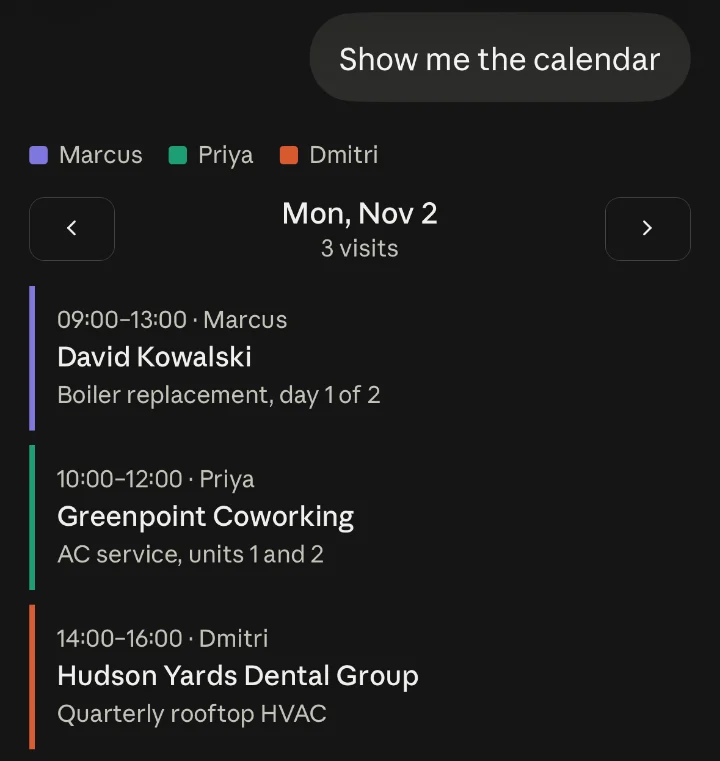
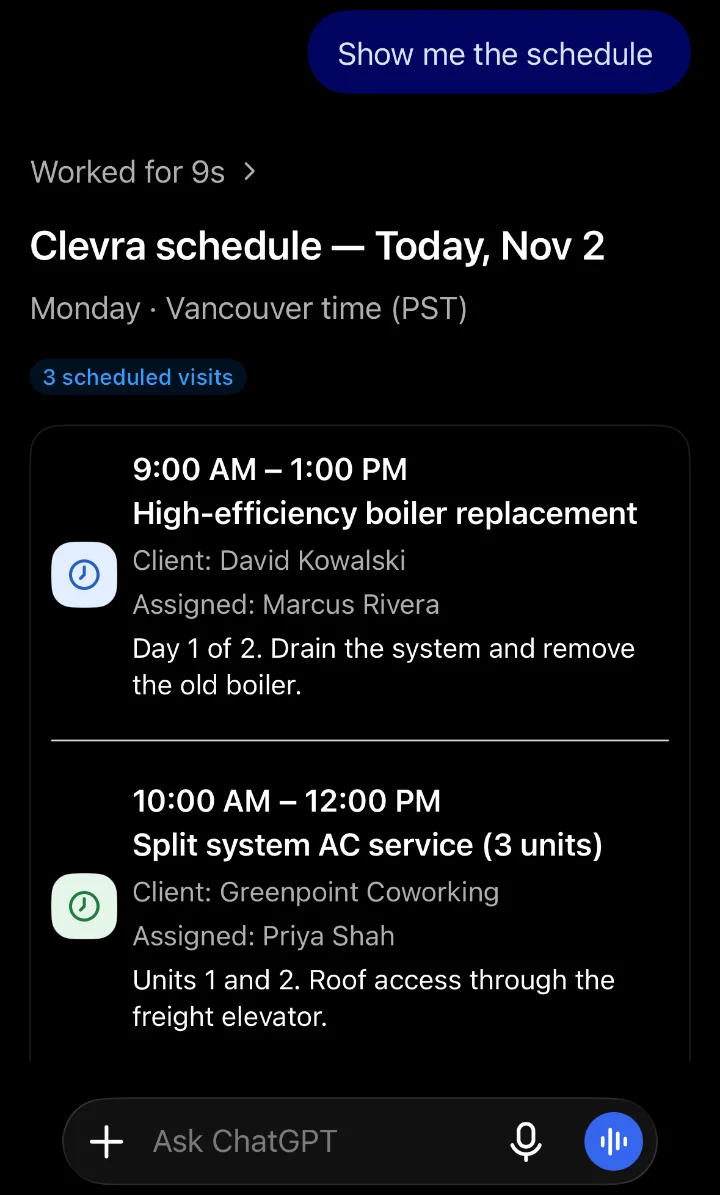
Ask about your schedule, invoices and clients in plain words. Answers come from your live Clevra data.

Try it free
Claude
Claude showing a day of Clevra visits as a calendar
ChatGPT
ChatGPT listing today's Clevra visits with times, clients and technicians

Integrations:

Simple Scalable Pricing for Every Team

Built Specifically for Small but Powerful Teams.

Free

For solo operators just getting started

$0
free forever
Everything you need to start:
  • 1 seat
  • 1 customizable sales pipeline
  • Unlimited clients
  • Estimates, invoicing, and payments
  • Customer portal

Clevra branding on estimates, invoices, and portal

Pro
Recommended

For small crews ready to work smarter

$39/mo
billed annually · $468/yr
$49/mo
billed monthly
Everything in Free, plus:
  • 5 seats
  • 3 customizable pipelines
  • AI assistant
  • Automations + reports
  • QuickBooks integration
  • SMS notifications + two-way SMS
  • Your own logo on estimates, invoices, and portal
  • AI receptionist add-on — $25/mo
Business

For growing field-service teams ready to scale

$79/mo
billed annually · $948/yr
$99/mo
billed monthly
Everything in Pro, plus:
  • 15 seats
  • Unlimited pipelines
  • Guided onboarding
  • AI receptionist add-on — $25/mo
Custom

For established service companies

Custom price
Everything in Business, plus:
  • Custom seats
  • Custom setup and onboarding
  • Dedicated support

FAQ

Questions contractors actually ask.

What is Clevra?
Faq Arrow Faq Arrow

Clevra is field service software built around what your crew captures on site. Techs fill in checklists and take photos on their phones, and Clevra turns them into a finished PDF report with a cover photo, numbered photos, a sign-off and a revision history. You send it to your client straight from Clevra. Scheduling, estimates, jobs, invoicing, payments and your client list run in the same app, with an AI receptionist and an AI assistant built in. It's made mainly for small and medium service teams, and the free plan includes one seat and unlimited clients.

Who is Clevra for?
Faq Arrow Faq Arrow

Owners of field service businesses, starting with utility locating, concrete scanning and inspection companies: backflow testing, septic, sewer camera, roof and other inspection trades. Clevra also works for HVAC, plumbing, electrical, roofing, cleaning, landscaping and 30+ other trades. It fits a solo operator on the Free plan up to a 15-person crew on Business, with Custom plans for bigger teams.

Is there a free plan?
Faq Arrow Faq Arrow

Yes. The Free plan is $0 forever with one seat and unlimited clients. It includes scheduling, estimates, invoicing, online payments and the customer portal, enough to run a real business. Paid plans start at $39/mo billed annually, or $49 month to month.

How does Clevra compare to Jobber?
Faq Arrow Faq Arrow

Clevra has a free plan, seat bands instead of per-user pricing (5 seats on Pro, 15 on Business), detailed photo capture and inspection reports, and an AI receptionist and AI assistant in the same app. Jobber has no free tier, costs more and charges per user, and doesn't offer the same depth of photo capture and reporting.

What trades does Clevra support?
Faq Arrow Faq Arrow

Clevra is built first for utility locating, concrete scanning and inspection and testing, including backflow, septic, sewer camera, roof and fire protection work. It's also set up for HVAC, plumbing, electrical, roofing, cleaning, landscaping and 30+ more trades. Pick yours when you sign up and Clevra suggests the services that fit.

Does Clevra have AI agent features?
Faq Arrow Faq Arrow

Yes. The AI receptionist answers the calls your team misses, takes the caller's details and files a request. It's a $25/mo add-on for Pro and Business. The AI Business Assistant answers questions about your jobs, invoices and schedule on paid plans, and you can use Clevra inside Claude and ChatGPT. The AI Office Manager, AI Quote Closer and Voice-first AI Field Copilot are coming soon.

What is home service software?
Faq Arrow Faq Arrow

Home service software is a tool that helps contractors manage the day-to-day of running a service business: booking jobs, sending quotes, invoicing customers, collecting payments, and tracking their crew. It replaces the spreadsheets, paper forms, and phone calls that most shops start with.

Does Clevra work on my phone?
Faq Arrow Faq Arrow

Yes. Clevra works in the browser on any phone or tablet, so your techs can see their schedule, update jobs, send estimates, collect payments and add photos from the field. A dedicated technician app is coming soon.

Can I switch from Jobber or Housecall Pro to Clevra?
Faq Arrow Faq Arrow

Yes. Import your client list from a CSV file on any plan, including Free. Jobber, Housecall Pro and spreadsheets all export to CSV, and our team can help you move the rest.

Cta Dot Bg

All-in-one operations platform for trades.

You run a crew, not a tech company. Clevra handles the office stuff so you can stay on the tools.